
Uncategorized
Problems with TurboCAD
In very rare occasions TurboCAD misbehaves. The standard cure for this is a simple Default.
Tools menu – work space – customize – options tab – click “Default” This fixes the problem 99% of the time.
In very rare circumstances, the configuration INI files may become corrupted causing loss of functionality, and no amount of customizing will restore them. To fix this problem, the standard procedure is to force TurboCAD to reconstruct the “Built-in” folder by deleting it. This will restore most TurboCAD settings to those found in a brand new installation.
Close TurboCAD
Window Key + R
type %APPDATA%
click OK and navigate the “IMSIDesign” folder
drill down until you get to the “Profiles” folder, similar to this path,
C:\Users\username\AppData\Roaming\IMSIDesign\TurboCAD 2021\Platinum (or Pro, Deluxe, Designer) x64\Profiles
open the “Profiles” folder to see the “Built-in” folder
Delete the “Built-in” folder
Restart TurboCAD
Uncategorized
Sheets / Printing TC Mac v12
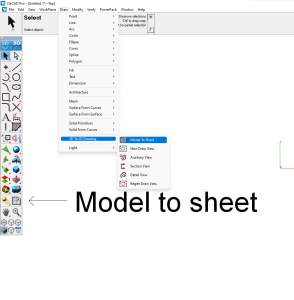
I have been asked where to find the tools to set up sheets and print with TC Mac v12. The image below should help.
Uncategorized
AVG anti-virus
Occasionally I have a customer who has trouble loading TC when they have AVG security on their computer. The advice to overcome this from a trusted technician at the publisher’s is below.
The customer should be able to disable AVG temporarily during the install of TurboCAD.
Uninstall – reboot – disable AVG – reinstall
Usually works for my customers
Odd that some people use a third party AV when Windows 10 has a VERY GOOD built in anti-virus.
George McNamara
Uncategorized
Importing Fonts
Notes from a trusted customer who at first tried unsuccessfully to import fonts into TurboCAD.
I searched for a font converter, thinking I would convert to SHX files. The answer is my missing fonts were OTF type. They install in Windows 10 but TurboCAD does not recognise them. TurboCAD likes TTF fonts. Convertio does the trick, it converts files. My OTFs are now TTFs, and TurboCAD is quite happy.
See Link https://convertio.co/font-converter/
It says ‘FREE’, but the limit is 10 converts per day, then it tries to smack you with buying a licence.
Paul
Uncategorized
Upgrading from within 2021
INSTRUCTIONS for those upgrading their TC from say Designer to Deluxe, or any version to Platinum from within 2021. Below are the instructions from the publisher which I have tried and worked for me.
These steps “should” work but success seems about 50/50
Go to the Help menu – Update TurboCAD edition
If a web page pops up, close it and look for a dialog box
You might have to minimize TC to see the dialog box
Input the new license key there
Uncategorized
Clean Instal
Updating your 2019 or 2020 from Deluxe to Platinum needs you to get rid of you Deluxe first, the same can apply if you buy and load after having a trial version.
Instructions on the best way to carry this out is at the link below.
Uncategorized
Upgrading from Deluxe to Platinum
If you upgrade from say Deluxe to Platinum within the same version of TC, you need to go to HELP – Update TurboCAD Edition.
The message on the upgrade screen is to buy an upgrade but when you press ‘buy an upgrade’, the new code screen comes up and and you are able to type in your new code, you do not have to pay any money. Confusing I know, but it works fine, (when you know).
Paul
Uncategorized
Loading TurboCAD Mac v12
A trusted regular TC Mac user has sent me the instructions below concerning loading the new TC Mac v12. It is slightly different from the instructions for v11.
- Run TurboCAD12.app; gives the ‘Can’t run this….’ error message. Options are ‘Move to Bin’ and ‘Cancel’. Choose ‘Cancel’.
- Open System Prefs and go to Security & Privacy > General.
- Run TurboCAD12.app again. Get the same error message,
- Click ‘Cancel’ in the Error box.
- In Security & Privacy > General, click on ‘Run Anyway’
- That should open TurboCAD 12, and bring up the Activation dialog.
- Cancel out of this, and exit TurboCAD 12.
- Run TurboCAD12.app again. This will bring up the Activation dialog, which you can now complete.
Link for the Mac versions
https://paulthecad.com/product/turbocad-for-apple-mac/
Uncategorized
CAD Design Projects
At the London Model Engineering Exhibition, I met an engineer keen on taking on new 3D CAD projects.
His CV describes a degree level educated mechanical engineer, with extensive experience in the building of prototypes and electrical systems using several different CAD systems.
His contact details are below and I’m sure he would welcome enquires and be happy to forward his CV.
Tim McDermott
| [email protected] |
Uncategorized
Copy in Place
Copy In Place
This can be a useful tool that is not where you’d expect to find it. Below is where you can find it in Platinum versions 2018 and 2019 as well as Deluxe versions.
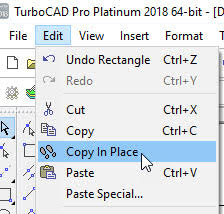
In Platinum versions it can also be found under SDK – Selection.
Select the object to copy first, then the tool.
Paul
FREE Support with Every Product Purchase
 Buy from this site and I'll provide unlimited telephone and email support!
Need a website?

PaulTheCAD (and my other sites) was built and is maintained by Tim at Clever Digital Stuff. I've been working with Tim for over 10 years, he really knows his stuff. If you need a site or just some advice about anything digital, take a look at cleverdigitalstuff.com and give Tim a call - Tell him I sent you and you'll get a discount.