
Uncategorized
Problems with TurboCAD
In very rare occasions TurboCAD misbehaves. The standard cure for this is a simple Default.
Tools menu – work space – customize – options tab – click “Default” This fixes the problem 99% of the time.
In very rare circumstances, the configuration INI files may become corrupted causing loss of functionality, and no amount of customizing will restore them. To fix this problem, the standard procedure is to force TurboCAD to reconstruct the “Built-in” folder by deleting it. This will restore most TurboCAD settings to those found in a brand new installation.
Close TurboCAD
Window Key + R
type %APPDATA%
click OK and navigate the “IMSIDesign” folder
drill down until you get to the “Profiles” folder, similar to this path,
C:\Users\username\AppData\Roaming\IMSIDesign\TurboCAD 2021\Platinum (or Pro, Deluxe, Designer) x64\Profiles
open the “Profiles” folder to see the “Built-in” folder
Delete the “Built-in” folder
Restart TurboCAD
Uncategorized
Copy in Place
Copy In Place
This can be a useful tool that is not where you’d expect to find it. Below is where you can find it in Platinum versions 2018 and 2019 as well as Deluxe versions.
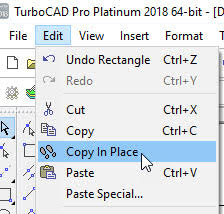
In Platinum versions it can also be found under SDK – Selection.
Select the object to copy first, then the tool.
Paul
Uncategorized
Switching Tower Tutorial Video Series
Switching Tower Tutorial Video Series
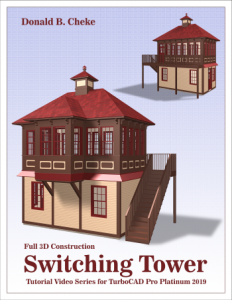
Don Cheke has a new Architectural tutorial on the market. Don’s tutorials are excellent, he’s the man who taught me just about all I know about TurboCAD. Below I have copied Don’s description of his new tutorial. You can find tutorials for all sorts of projects on his site.
Within the tutorial the reader will be lead through each keystroke to produce all the switching tower components utilizing many of the TurboCAD Architectural tools. The reader will also learn how to insert standard lighting, will learn how to utilize render scene luminance and establish a render scene environment. The reader will learn how to render their model and save it in a high resolution image format.
Don’s Site
http://www.textualcreations.ca/
Uncategorized
Upgrading
Upgrading from a Trial version
If you have previously installed a different, or trial version of the TurboCAD 2018 program you may then need to do the following to completely delete that version before installing.
- Exit TurboCAD and uninstall the program via the control panel
- Download the following zip file and run its contents to clear the other trial license …
http://downloads.imsidesign.com/TC2018/deactivate_TC2018_x64.zip
Be sure to click the “Clear License” option.
You can then reinstall
Uncategorized
Rendering
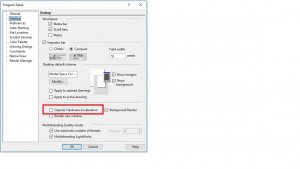
If you have a problem with rendering – For some, when moving objects around and swapping between wireframe and rendered views, TurboCAD has been crashing. This is solved by ensuring that Open GL Hardware Acceleration is turned off, as below.
Uncategorized
RedSDK
Now that in TurboCAD 2018 LightWorks is back as default, RedSDK can be bought as a plug in. The cost is £100, I will not keep a stock of them, but can obtain licenses within 24 hours. Email or call me to order.
Paul
Uncategorized
New Keyboard Commands
Another a new development in soon to come v 2018. Extra keyboard commands under TOOLS – Customise – Keyboard.
It obviously depends on what tools you use a lot and find most useful, but here’s one example, Zoom Extends. In previous versions, you were able to assign a key, say Z to zoom out incrementally, but not to extends and as you could zoon out simply by rolling your wheel mouse there was little point. You could click on the Zoom Extends icon at the top of your screen, or there is the little trick of tapping your wheel that normally works.
However in 2018 you can assign a single key to Zoom Extend, I tried it with Z and it worked a treat. Z did have a different function by default, but not one that I ever used.
Also good to know that the Default button puts them all back to what they were doing before you started mucking about with them.
Paul
Uncategorized
TurboCAD 2018 The Return of LightWorks
I’m very pleased to say that LightWorks is returning to TurboCAD, RedSDK is now an optional plug-in. I have not yet seen the new version, but I’d presume that LW will be its old easy to use self.
2018 is due out at the end of March, but experience tells me that this will be delayed, release dates for all sorts of software often are, so I’m sure it will be here by the end of April.
Paul
Uncategorized
AutoCAD Training
If you need help with AutoCAD on a personal level, rather than organised classes, then I have recently met a chap who used AutoCAD in his work and is now semi-retired and teaches AutoCAD. He might even be persuaded to take on projects.
His name is Clive Osmond and can be contacted by email at the address below.
Uncategorized
Problems Watching Training Films
If Training Films will not play, or you only hear or only see them, and both of these have happened to me, then the fix is to download the VLC Player from the link below.
I believe that it is updated on a fairly regular basis, so you may need to do this occasionaly.
Get VLC Player from here: https://www.videolan.org/vlc/index.en-GB.html
Paul
FREE Support with Every Product Purchase
 Buy from this site and I'll provide unlimited telephone and email support!
Need a website?

PaulTheCAD (and my other sites) was built and is maintained by Tim at Clever Digital Stuff. I've been working with Tim for over 10 years, he really knows his stuff. If you need a site or just some advice about anything digital, take a look at cleverdigitalstuff.com and give Tim a call - Tell him I sent you and you'll get a discount.