
Uncategorized
New Variation on Inputting Angle
A new useful tool in TurboCAD 2018
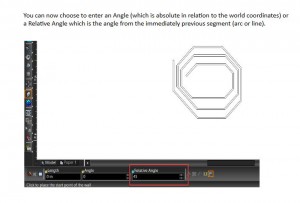
You can now choose to enter an Angle (which is absolute in relation to the world coordinates) or a Relative Angle which is the angle from the immediately previous segment (arc or line).
Uncategorized
TurboCAD 2018 The Return of LightWorks
I’m very pleased to say that LightWorks is returning to TurboCAD, RedSDK is now an optional plug-in. I have not yet seen the new version, but I’d presume that LW will be its old easy to use self.
2018 is due out at the end of March, but experience tells me that this will be delayed, release dates for all sorts of software often are, so I’m sure it will be here by the end of April.
Paul
Uncategorized
AutoCAD Training
If you need help with AutoCAD on a personal level, rather than organised classes, then I have recently met a chap who used AutoCAD in his work and is now semi-retired and teaches AutoCAD. He might even be persuaded to take on projects.
His name is Clive Osmond and can be contacted by email at the address below.
Uncategorized
Faceting
If your cylinders are showing as facets rather than smooth surfaces, you can change this in the dialogue box as below.
At the top go to – OPTIONS – ACIS
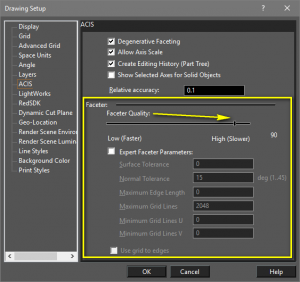
It is also here where you turn on Editing History.
These are Pro options and not in Deluxe.
Paul
Uncategorized
Solid White Fill
Solid White Fill
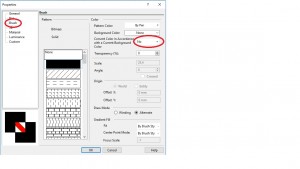
If you try to colour a closed shape in 2D white, the shape comes out as black. To make it white:
Select the shape
Right click.
Choose Properties – Brush.
Select ‘No’ in the box, as below.
Uncategorized
Problems Watching Training Films
If Training Films will not play, or you only hear or only see them, and both of these have happened to me, then the fix is to download the VLC Player from the link below.
I believe that it is updated on a fairly regular basis, so you may need to do this occasionaly.
Get VLC Player from here: https://www.videolan.org/vlc/index.en-GB.html
Paul
Uncategorized
Windows 10
A customer has passed this on to me – anyone got any ideas, let me know at [email protected].
Paul, I’d just like to report my experience with Windows 10 Creators Update (I guess I am not alone). After this Windows update installed I randomly lost some lines on my monitor. I tried various adjustments to the Options/Display settings without success. The only cure I found was to roll back from Windows Creator to Windows Anniversary – This fixed the problem. Is this a known issue? Is there any solution available? Thanks, Mike
Uncategorized
Problem Seeing Training Films
The files that my training films are saved in are avi and some computers will not read them. So if you have purchased training films from me on a USB stick, but can hear me but not see anything then you need to download the VLC Player, it only takes seconds to download and is free.
​You can get VLC Player from here: https://www.videolan.org/vlc/index.en-GB.html
If when you select the file, it still does not work, it’s because your computer it not choosing the right player, so right click on the file and select Open With, then choose VCL Player.
Paul
Uncategorized
A New Twist on Loading TurboCAD for Mac
I had a customer who recently had a lot of trouble loading TurboCAD Mac Deluxe because of the security that Mac imposes. When he eventually succeed, he was good enough to send me the solution – which is a new one on me.
Hi Paul,
The guy from Apple spent nearly an hour an a half on the phone to me but could not track down the source of the persistent “Mimecast” intervention, which should theoretically have been impossible. He did, however, provide a fix for the download.
For future reference for any of your customers with a similar problem, it was:
Don’t left click on the download. Right click and copy it, BUT DO NOT PASTE DIRECTLY TO THE BROWSER. Instead paste it somewhere bland (in my case to “Notes”) then copy it afresh from there and paste into browser.
That worked and download completed successfully!
Thanks for your help,
Uncategorized
TouchPad
A Touchpad tool is now available for the latest TurboCAD. At present, it is a free extra, although I understand that it will be in the programme as standard when the next version comes out next year. I presume that you would need win 10 for it to work, as it involves touching the screen, but then that is something I try to avoid. I’ll stick to my mouse.
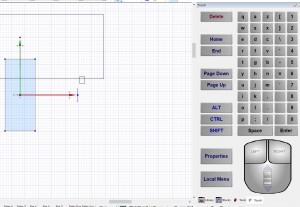
So, if you would like the tool and are a customer of mine, then send me an email requesting it and I’ll send you the link. There is no serial number involved it just downloads straight away and appears as a small icon at the top of your screen. Click on the icon and a panel appears on the right of your screen as below.
I can’t guarantee that it works like touchpads in other CAD software, I never use them, but if you try it and have any comments, then please let me know so that I can send feedback to IMSI.
Paul
FREE Support with Every Product Purchase
 Buy from this site and I'll provide unlimited telephone and email support!
Need a website?

PaulTheCAD (and my other sites) was built and is maintained by Tim at Clever Digital Stuff. I've been working with Tim for over 10 years, he really knows his stuff. If you need a site or just some advice about anything digital, take a look at cleverdigitalstuff.com and give Tim a call - Tell him I sent you and you'll get a discount.