
Uncategorized
New Keyboard Commands
Another a new development in soon to come v 2018. Extra keyboard commands under TOOLS – Customise – Keyboard.
It obviously depends on what tools you use a lot and find most useful, but here’s one example, Zoom Extends. In previous versions, you were able to assign a key, say Z to zoom out incrementally, but not to extends and as you could zoon out simply by rolling your wheel mouse there was little point. You could click on the Zoom Extends icon at the top of your screen, or there is the little trick of tapping your wheel that normally works.
However in 2018 you can assign a single key to Zoom Extend, I tried it with Z and it worked a treat. Z did have a different function by default, but not one that I ever used.
Also good to know that the Default button puts them all back to what they were doing before you started mucking about with them.
Paul
Uncategorized
New Variation on Inputting Angle
A new useful tool in TurboCAD 2018
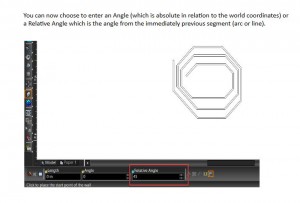
You can now choose to enter an Angle (which is absolute in relation to the world coordinates) or a Relative Angle which is the angle from the immediately previous segment (arc or line).
Uncategorized
TurboCAD 2018 The Return of LightWorks
I’m very pleased to say that LightWorks is returning to TurboCAD, RedSDK is now an optional plug-in. I have not yet seen the new version, but I’d presume that LW will be its old easy to use self.
2018 is due out at the end of March, but experience tells me that this will be delayed, release dates for all sorts of software often are, so I’m sure it will be here by the end of April.
Paul
Uncategorized
Faceting
If your cylinders are showing as facets rather than smooth surfaces, you can change this in the dialogue box as below.
At the top go to – OPTIONS – ACIS
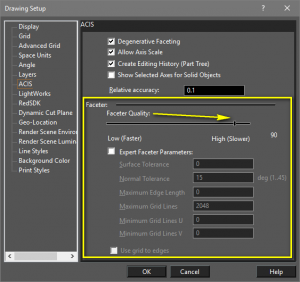
It is also here where you turn on Editing History.
These are Pro options and not in Deluxe.
Paul
Uncategorized
Solid White Fill
Solid White Fill
If you try to colour a closed shape in 2D white, the shape comes out as black. To make it white:
Select the shape
Right click.
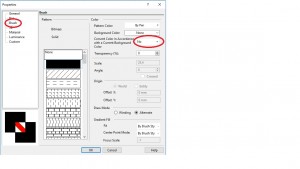
Choose Properties – Brush.
Select ‘No’ in the box, as below.
Uncategorized
Windows 10
A customer has passed this on to me – anyone got any ideas, let me know at [email protected].
Paul, I’d just like to report my experience with Windows 10 Creators Update (I guess I am not alone). After this Windows update installed I randomly lost some lines on my monitor. I tried various adjustments to the Options/Display settings without success. The only cure I found was to roll back from Windows Creator to Windows Anniversary – This fixed the problem. Is this a known issue? Is there any solution available? Thanks, Mike
Uncategorized
TouchPad
A Touchpad tool is now available for the latest TurboCAD. At present, it is a free extra, although I understand that it will be in the programme as standard when the next version comes out next year. I presume that you would need win 10 for it to work, as it involves touching the screen, but then that is something I try to avoid. I’ll stick to my mouse.
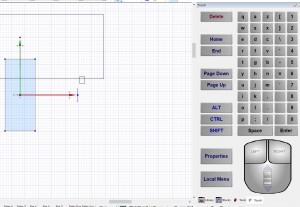
So, if you would like the tool and are a customer of mine, then send me an email requesting it and I’ll send you the link. There is no serial number involved it just downloads straight away and appears as a small icon at the top of your screen. Click on the icon and a panel appears on the right of your screen as below.
I can’t guarantee that it works like touchpads in other CAD software, I never use them, but if you try it and have any comments, then please let me know so that I can send feedback to IMSI.
Paul
Uncategorized
Black Screen
Any time the screen goes black there is a conflict with Redsdk. The solution is to run in GDI mode.
The dynamic cut plane is redsdk only. In 2017 there is a message that appears when user’s drivers do not specifically support the cut plane functionality. If this is the only time the user gets the corruption when they can run Redsdk but will have to do so without using the cut plane.
Uncategorized
Further Notes on Installing the Mac Versions
Apple only have their security open for Applications purchased/downloaded from the App Store
You can however, bypass this security function quite easily.
Simply right click (or ctrl+click if you don’t have a dual click mouse) and choose Open. You will still receive a warning that the application is from an unidentified developer but will have the opportunity to proceed any way.
Paul
FREE Support with Every Product Purchase
 Buy from this site and I'll provide unlimited telephone and email support!
Need a website?

PaulTheCAD (and my other sites) was built and is maintained by Tim at Clever Digital Stuff. I've been working with Tim for over 10 years, he really knows his stuff. If you need a site or just some advice about anything digital, take a look at cleverdigitalstuff.com and give Tim a call - Tell him I sent you and you'll get a discount.