
Uncategorized
Snap Angle in TurboCAD Professional and Deluxe
Snap Angle
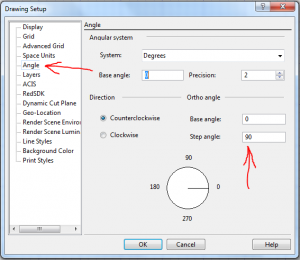
As a default, by holding down the Shift Key you can restrict drawing a line to 90 degree increments. (Horizontal or Vertical). This also goes for rotating a rectangles, or other polygon etc. You can edit this 90 in the Angle dialogue box under OPTIONS – Angle, to jump to any number of degrees.
You’ll also note that you can change the base angle from where you start drawing from.
Uncategorized
Computer Health Check

Virus Removal / Computer Clean
Even if you’re very careful, the best of us can pick up the odd virus. I’m lucky because the company has plenty of smart lads who can check my computer if seems to have slowed down, or does something I don’t think it should.
ProcessFlows has a computer check service that will link up remotely and check that your computer is healthy and all is as you’d hope.
The cost of this is £99, but I’ve done a deal with the company and my customers can get this service at half price, promo code PAULCAD50. You can book it on line, (link on the home page), or give them a call first on 0800 612 4814 to discuss.
It’s the sort of thing that’s a good idea to do once a year, at just over a pound a week to ensure that your computer is ‘healthy’, seems to me a good deal.
Paul
Uncategorized
TurboCAD Mac v9
TurboCAD v9 is now available – Upgrades from PaulTheCAD.com – click here.
Uncategorized
New TurboCAD Training
The site has now gone through another development. I have taken off a couple of products which have not turned out to have been popular and put on a couple of new products which I think will be very useful for all CAD users.
You now have the option to buy the PC software on a USB stick which also includes 12 training films with the Deluxe version and 15 with the Pro Platinum version.
Also, I now have a USB stick with 37 new training films on that I have made using v2015. These cost £37, a pound for each film. Details of it’s contents are below. If you’d like to purchase please click here.
Uncategorized
Loading the Mac version of TurboCAD
A few people have had a problem loading the Mac version of TC, it’s not quite so straight forward as the PC version, where you just more or less click on the download and say ‘Yes’ to everything.
Uncategorized
And Leaves
Thought you might like to see one of my paintings.

The rest are at the link below:
http://paultracey.net/
Uncategorized
TurboCAD Mac Versions
The system requirements for the latest v8 version is:
- Macintosh® OS X 10.7.x (Lion) , 10.8.x (Mountain Lion), 10.9.x (Mavericks) and 10.10.x (Yosemite)
- Intel® Mac®
- 4 GB of hard disk space
- 1 GB RAM or greater
- Mouse Pointing Device (wheel button recommended).
For sales of the Mac versions and information please click here.
Uncategorized
TurboCAD Mac v7 & 8
Please note that TurboCAD Mac versions 7 and 8 are not supported by Mac 10.7.
So if you are buying or upgrading you will need to check your Mac operating system.
Paul
Uncategorized
Smooth Curves in TurboCAD
Occasionally I have people having problems sending curved lines as DXF files to milling machines. The problem is that the curves turn into lots of straight lines, rather than a smooth one. The link below should solve this.
www3.turbocadcommunity.com/tiki-index.php?page=To+Arcs+Polyline
Paul
Uncategorized
Don Cheke’s TurboCAD Tips
At http://www.textualcreations.ca you will find much useful information on TurboCAD.
FREE Support with Every Product Purchase
 Buy from this site and I'll provide unlimited telephone and email support!
Need a website?

PaulTheCAD (and my other sites) was built and is maintained by Tim at Clever Digital Stuff. I've been working with Tim for over 10 years, he really knows his stuff. If you need a site or just some advice about anything digital, take a look at cleverdigitalstuff.com and give Tim a call - Tell him I sent you and you'll get a discount.