
Uncategorized
SketchUp Upgrades
After the 21st April, 2017, SketchUp will cut off the ability of SketchUp users of versions 6, 7 and 8 to buy the latest SketchUp at an upgrade price.
After that date SketchUp will treat these users as new customers who have to pay the full price if they want the latest version.
Paul
Uncategorized
TurboCAD Pro Platinum 2017
Below are three links to IMSI, the publishers of TurboCAD giving information about the new TurboCAD versions. You will note that they have given up the idea of having a Pro and a Pro Platinum version, there’s just a pro Platinum version, wave goodbye to Pro.
However, there is now a halfway house between Deluxe and Pro Platinum called Expert.
Key Features Comparison
https://www.turbocad.com/content/turbocad-2017-compare-key-features
New Features Comparison
https://www.turbocad.com/content/turbocad-2017-new-feature-comparison
Uncategorized
Unexpected Problems
Occasionally I’ll get a call from someone saying that their keyboard shortcuts have stooped working, or perhaps the delete key has ceased working. The quick fix for this is often to reset the defaults. So you go to TOOLS – Customize and in the General Section hit the Default button. Moat of the time this solves the problem, the downside is that it resetts all defaults, so if you screen is in any way customized, you will have to do this again.
However, if this does not work, or there are other problems with functionality, you would need to try removing the contents of the built-in folder as your next step in troubleshooting anything strange or unheard of.
Reported symptoms range from Unhandled Exceptions (UEs) to tools completely missing from the program’s commands list, as well as the loss of keyboard shortcuts and other default keyboard commands. Another commonly reported symptom is one or more tools will suddenly stop working as designed. In many cases deleting the contents of the built-in folder specific to the product will solve the problem.
Below shows you where you will find the Built In Folder for you version.
C:\Users\<username>\AppData\Roaming\IMSIDesign\TurboCAD 2016\Professional x64\Profiles\Built-in
C:\Users\<username>\AppData\Roaming\IMSIDesign\TurboCAD 2016\Professional\Profiles\Built-In
C:\Users\<username>\AppData\Roaming\IMSIDesign\TurboCAD 2016\Deluxe x64\Profiles\Built-In
C:\Users\<username>\AppData\Roaming\IMSIDesign\TurboCAD 2016\Deluxe\Profiles\Built-In
C:\Users\<username>\AppData\Roaming\IMSIDesign\TurboCAD 2016\Designer x64\Profiles\Built-In
C:\Users\<username>\AppData\Roaming\IMSIDesign\TurboCAD 2016\Designer\Profiles\Built-In
Paul
Uncategorized
Driver Issues with TurboCAD and Windows 10
What’s a driver?
When offered a free upgrade to Windows 10, many people have downloaded it only to find that things had gone a bit skew whiff. This is because if you download a new operating system, you may also need to update your graphics card drivers and that was probably not made clear to you – so here’s a little information that should help.
Drivers are a bunch of files that enable hardware devices to communicate with the computer’s operating system, a sort of translator, and they are operating system specific, i.e. – change your operating system – change your drivers – they go together. Do one and not the other and you could have problems.
For users who are doing fairly straight forward 2D line drawings, there is a quick fix which avoids the complications of changing your drivers and that is to swap from Redsdk to GDI, where to do this is shown below.
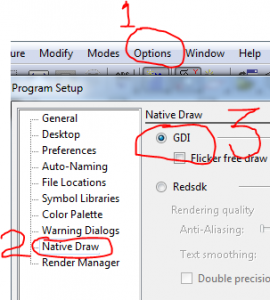
For most TurboCAD users, this simple quick fix solves their problem. The program restarts and everything is fine. However, this is not ideal. One drawback is that you can no longer use materials, Redsdk materials will not work in GDI. So if you want materials, you’ll probably need to install the latest graphics card drivers. (This may have occurred automatically).
To install the correct driver for your computer you need to go to the manufacturer’s web page and find the software and driver downloads section. Here it will ask you to identify your computer by inputting essential information such as model or serial number, from there you’ll be lead to a page with a list of downloads and you will want to look for the one relating to graphics.
So now you are in the correct place, all the information you have typed in is correct and all you have to do is press the download button. First just ask yourself a couple of questions – are you sure everything you’ve typed in is correct? – are you sure that anything on the computer that is really important to you is backed up? Do you really know what you are doing?
If you cannot say Yes for sure 100% to all those questions, my advice would be to get an expert to do it for you.
Paul
Uncategorized
Problems loading and/or launching TurboCAD
Now and again customers have a problem initially installing and launching TurboCAD, this could be in the shape of TurboCAD asking for an activation code every time you load, or TurboCAD not being able to read the serial number resulting in the error message “Your serial number is either missing or incorrect”.
The link below will take you to a post on the TurboCAD Forum that will explain how to solve this. Note that where it says Vista+, it means Vista and all subsequent operating systems.
http://forums.turbocad.com/index.php/topic,9797.msg57814.html#msg57814
Paul
Uncategorized
Notes on Installing the Mac version of TurboCAD
When inputting the activation code in TurboCAD, it is best to cut and paste the one that I have sent you, rather than type it in, this way just seems more reliable. Ensure that no extra spaces or characters are being copied. Also if it does not work then you’ll need to restart TCMAC before trying it again.
Prior to El Capitan, the MAC OS gave users the ability to repair disc permissions via their Disc Utility. So if you are on 10.10 (Mavericks) or prior you should do this then re-install TCMAC.
Paul
Uncategorized
Snap Angle in TurboCAD Professional and Deluxe
Snap Angle
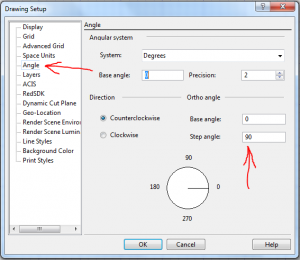
As a default, by holding down the Shift Key you can restrict drawing a line to 90 degree increments. (Horizontal or Vertical). This also goes for rotating a rectangles, or other polygon etc. You can edit this 90 in the Angle dialogue box under OPTIONS – Angle, to jump to any number of degrees.
You’ll also note that you can change the base angle from where you start drawing from.
Uncategorized
Computer Health Check

Virus Removal / Computer Clean
Even if you’re very careful, the best of us can pick up the odd virus. I’m lucky because the company has plenty of smart lads who can check my computer if seems to have slowed down, or does something I don’t think it should.
ProcessFlows has a computer check service that will link up remotely and check that your computer is healthy and all is as you’d hope.
The cost of this is £99, but I’ve done a deal with the company and my customers can get this service at half price, promo code PAULCAD50. You can book it on line, (link on the home page), or give them a call first on 0800 612 4814 to discuss.
It’s the sort of thing that’s a good idea to do once a year, at just over a pound a week to ensure that your computer is ‘healthy’, seems to me a good deal.
Paul
Uncategorized
TurboCAD Mac v9
TurboCAD v9 is now available – Upgrades from PaulTheCAD.com – click here.
Uncategorized
Loading the Mac version of TurboCAD
A few people have had a problem loading the Mac version of TC, it’s not quite so straight forward as the PC version, where you just more or less click on the download and say ‘Yes’ to everything.
FREE Support with Every Product Purchase
 Buy from this site and I'll provide unlimited telephone and email support!
Need a website?

PaulTheCAD (and my other sites) was built and is maintained by Tim at Clever Digital Stuff. I've been working with Tim for over 10 years, he really knows his stuff. If you need a site or just some advice about anything digital, take a look at cleverdigitalstuff.com and give Tim a call - Tell him I sent you and you'll get a discount.